Deciding to change a domain name is a big step, whether you’re rebranding, expanding, or refining your online identity.
But while this process is simple in a technical sense, it can create headaches without a careful strategy—think lost traffic, confused customers, and a costly drop in search rankings.
The good news?
A domain change doesn’t have to come at the cost of your online presence. With the right approach—properly updating DNS settings, implementing redirects, and communicating clearly with customers—your website can continue performing without setbacks.
In this guide, we’ll walk you through the right way to change your domain name, explore the role a domain plays in your brand’s success, and outline the key reasons for making a switch. You’ll also learn how to avoid common mistakes and ensure your website continues to perform at its best.
Keep reading to make this crucial transition as smooth as possible.
Is changing your domain name a good idea?
Your domain name is more than just a web address—it’s often the first impression your brand makes. It acts as the gateway to your business, shaping brand recognition, marketing impact, and customer trust. A strong domain should be easy to find, memorable, and aligned with your brand identity.
While changing a domain might seem straightforward, you shouldn’t take this decision lightly.
A domain switch represents a major shift in your online presence and can have lasting effects on SEO, visitor trust, and even sales.
A poorly planned change could confuse your audience, disrupt traffic, and weaken your search rankings. That’s because, when your old domain is deactivated, users trying to access it will hit a dead end—with DNS errors blocking their way.
That said, there are valid reasons for making the switch. Here’s when changing your domain name might be the right move:
- Rebranding – If your brand name, services, or focus is shifting, a fresh domain that better reflects your identity can help you connect with your target audience more effectively.
- Boosting brand recognition – A simpler, more memorable domain—especially one with relevant keywords—can increase brand recall, improve searchability, and drive more traffic and conversions.
- Expanding your offerings – If your business has outgrown its original niche, a broader, more inclusive domain can align better with your expanded range of products or services.
- Strengthening search visibility – Domains that feature key search terms or geographic locations can strengthen your SEO strategy, helping potential customers find you more easily.
- Overcoming reputation challenges – If your existing domain is tied to spammy links, penalties, or a negative history, switching to a new domain can offer a fresh start and improve credibility.
- Improving accessibility & UX – A domain that’s shorter, easier to spell, and mobile-friendly enhances usability—especially for international visitors or users on small screens.
- Upgrading to a more trustworthy TLD – Moving from a less common extension (like .info or .biz) to a widely recognised one (such as .com or .com.au) can build authority and user trust.
- Fixing a confusing or unintuitive domain – If your current domain is difficult to spell, too long, or doesn’t align with your brand, switching to something clearer and more user-friendly can reduce errors and improve direct traffic.
Let’s take a look at the most common reasons in more detail:
You’ve changed your business name
A business name change—whether for legal reasons, rebranding, or strategic growth—means your domain should follow suit. Keeping your domain aligned with your brand name ensures consistency, strengthens recognition, and avoids customer confusion.
A matching domain not only reinforces your brand identity but also boosts professionalism and makes it easier for customers to find you online.
Your domain name doesn’t reflect your brand anymore
As industries evolve, so do businesses. If your domain name no longer reflects your brand’s identity or fails to differentiate your offerings in the market, it might be time for a change.
Your domain is often the first impression customers have of your business—it sets the scene for how they perceive your brand. If you’ve rebranded, expanded your services, or shifted focus, an outdated domain could misrepresent who you are today.
Refreshing your domain to match your current brand ensures consistency, strengthens your identity, and keeps your business relevant in the digital space.
Your domain name doesn’t match your tone of voice
A domain name sets expectations for your audience. If it feels too formal, too casual, or out of sync with your brand’s personality, it can create the wrong impression.
For a professional audience, a refined and authoritative domain works best, while a more relaxed or playful name suits brands targeting younger, trend-focused consumers.
If your current domain no longer aligns with the image you want to project, updating it can improve brand perception and strengthen your connection with the right audience.
You need to update your domain extension
Whether budget constraints led you to settle for a less-than-ideal TLD or you’ve found an extension that better suits your industry, updating your domain can enhance your brand’s credibility and relevance.
Maybe you originally wanted a .com but had to choose an alternative—now you have the means to secure it. Or perhaps your business has evolved, and a niche-specific extension like .tech or .club better represents your brand. Upgrading to the right TLD can improve recognition, trust, and alignment with your industry.
Your domain name just isn’t sticking
Is your domain name cluttered with hyphens, numbers, or unnecessary complexity? A long or hard-to-spell domain makes it difficult for people to recall and type correctly—resulting in lost traffic and missed opportunities.
A clean, simple, and catchy domain name boosts brand recognition and ensures visitors can easily find their way back to your site.
Put your domain through the “Radio Test.” If someone hears it aloud without seeing it written, would they be able to spell it correctly and visit your site without confusion? If not, it’s time for an upgrade.
What to consider before changing a domain name
Changing a domain name can impact various aspects of your website. Visitors might be confused by the switch and question whether they’re on the correct site, but that’s just one of the challenges.
For example, managing SEO during a domain change can be particularly tricky. Search engines associate value with domain names, so swapping to a new one can result in a drop in search rankings if not handled properly.
Additionally, don’t overlook other technical details. If your email is tied to your old domain, you’ll need to configure it for the new one and update any contact details displayed on your website.
Moreover, depending on the extent of the rebrand, you might also need to secure social media handles that match your new domain. Some platforms let you update existing names, making the transition a bit smoother.
Keep reading to take a closer look at each risk – and what you can do to mitigate them.
Wasted time and money
While standard domain registrations are relatively affordable, premium domain names can come with a hefty price tag. If you’re considering a domain change without a clear strategic purpose, you could be throwing away money and time that would be better invested in growing your business.
Think carefully before making the switch to ensure it’s worth the cost.
Falling search engine rankings
One of the biggest risks of changing your domain name is a drop in organic traffic or search rankings. When you switch domains, search engines need time to crawl and re-index your site. This process can be unpredictable, and during this period, your search traffic might temporarily decline.
Thankfully, there are strategies to minimise these risks.
Firstly, consider the age of your domain. Domain age is an SEO ranking factor, and older domains often carry more authority. If possible, purchase the new domain ahead of time and hold on to it before making the switch. While this won’t eliminate the risk of traffic dips, it can help reduce the impact.
Properly implementing redirects is another essential step. Redirects signal to search engines that your site has moved and transfer the SEO value (“juice”) from your old domain to the new one.
This helps preserve your previous efforts and ensures your content can maintain its search rankings, avoiding the challenges of starting fresh.
Loss of backlinks
Backlinks—links from other websites that lead to yours—are a cornerstone of any solid SEO strategy. If you’ve put effort into building a strong backlink profile, switching your domain can disrupt this, as those links will no longer point directly to your site. This can result in a loss of valuable traffic and authority.
Setting up proper redirects can help reduce the damage, but it’s important to note that redirected backlinks typically don’t carry the same SEO value as direct ones.
To minimise the impact, you can contact the websites linking to your old domain and provide them with updated URLs, or focus on rebuilding your backlink strategy to align with your new domain.
Decline in brand awareness
Changing your domain name can directly impact your brand recognition, especially if you have a loyal audience who visits your site by typing the domain into their browser. If they use your old domain and it no longer works, they might assume your website has shut down for good.
While some visitors will notice and adapt to the change, not everyone will catch on right away. To bridge the gap, consider adding a clear announcement or pop-up on your website to highlight the new domain or rebrand.
This proactive approach helps your audience know where to find you moving forward, ultimately reducing the risk of losing direct traffic.
How to change a domain name without losing traffic
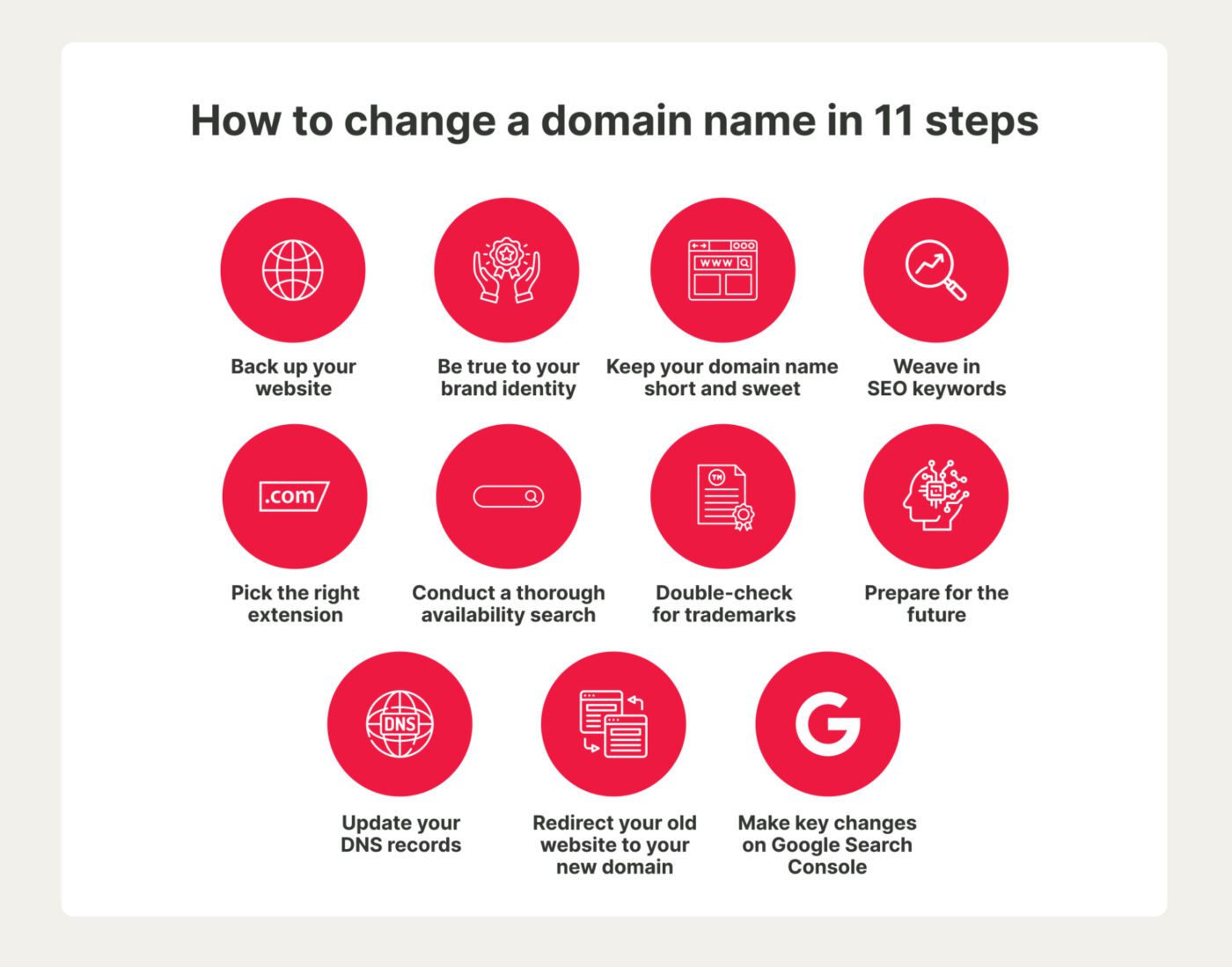
Changing your domain name is a simple process, but protecting your website demands attention to detail. To keep your site running smoothly, we’ve outlined the key steps to change your domain name while maintaining your audience, search rankings, and brand credibility.
Let’s dive in.
1. Back up your website
Before making the leap to a new domain, ensure you have a full backup of your website.
Think of it as an insurance policy—if anything goes sideways during the transition, you’ll have a secure copy of everything, ready to restore at a moment’s notice. This prevents unnecessary downtime, lost content, and the headache of rebuilding from scratch.
The backup process will vary depending on your website setup.
Factors like your content management system (CMS), hosting environment (self-hosted vs. managed), and domain provider all play a role in how you should approach it. Some platforms offer one-click backups, while others may require manual file and database exports.
To avoid missteps, take the time to research your platform’s backup process, double-check that everything is saved correctly, and store your files in multiple locations—such as cloud storage and an external drive—for extra peace of mind.
A little preparation now can save you from major headaches later.
2. Be true to your brand identity
A domain name should reflect what users can expect from your website, making it easier for them to recognise, remember, and trust your business. If the domain is too generic or disconnected from what you offer, it can create confusion and weaken brand recognition.
When changing your domain, keeping some level of similarity to the previous one helps maintain continuity. This approach allows for a rebrand without losing existing audience trust. A sudden and drastic change may make it harder for customers to find you, affecting both engagement and search engine rankings.
Standing out is also essential.
Choosing a domain too close to a competitor’s can create brand confusion and make differentiation difficult. A unique, relevant, and easy-to-remember domain positions your business effectively and helps establish a stronger presence online.
For example, imagine your company is called Australian Eco Landscaping and originally had the domain australian-eco-landscaping.com.au. For a fresher, more streamlined URL, you might change your domain name to ausecolandscaping.com.au. This keeps the core brand identity intact while making the domain shorter and more memorable.
On the other hand, switching to something like greenlandscaping.com.au could dilute brand recognition and make it harder for existing customers to find you.
3. Keep your domain name short and sweet
A great domain name should be short, sharp, and impossible to forget. The easier it is to type and say, the easier it is to share.
Avoid long, complicated names that invite typos or confusion—if people stumble over pronouncing it, they won’t spread the word. A punchy, memorable domain fuels recognition and makes your brand effortlessly shareable.
4. Weave in SEO keywords
An SEO keyword is a term or phrase people use to look for products, services, or information on search engines. Strategic keywords can make your site easier to find and instantly communicate what you offer.
Selling ski gear? A domain with “ski” in it can help you attract the right audience straight from search results.
But don’t box yourself in.
While keywords can work in your favour, a domain that’s too specific might limit future growth. Keep it flexible, relevant, and built for the long haul.
Take care, too, that your new domain name isn’t only a keyword, as this can cause some major challenges for future ranking growth.
For instance, if your site is buyshoesonline.com, how will users find you if they’re looking for your brand?
It’s also always good to do a quick Google search on your ideas to check what the search results look like so you know what you’ll be up against when you go live!
5. Pick the right extension
Although .com might be the most common extension out there, it’s not your only option. Sleek, industry-specific extensions like .tech, .design, or .store can make your brand stand out, while local TLDs like .sydney or .melbourne help you connect with nearby customers.
With so many options available, you can choose an extension that reinforces your brand, grabs attention, and makes it effortless for people to find and trust you.
6. Conduct a thorough availability search
Before locking in your domain, run a search through a trusted domain registrar to see if it’s available. Simply type your preferred name into the search tool and check your options.
If your first choice is taken, don’t panic—have a few variations or synonyms ready that still reflect your brand’s identity. AI-powered domain generators can also help spark creative alternatives.
For seamless branding, ensure your chosen name is also available across social media platforms, so your business remains consistent and easy to find everywhere online.
7. Double-check for trademarks
A domain name might be available, but that doesn’t mean it’s free to use. If it’s already trademarked by another company, you could face legal disputes, fines, or even be forced to rebrand—a costly mistake you don’t want to make.
To stay on the safe side, run a trademark search before registering your domain:
- Check government trademark databases – In Australia, use IP Australia (ipaustralia.gov.au). If you’re operating internationally, check databases like the USPTO (USA) or the EUIPO (Europe).
- Search business directories – Look up the name on ASIC Connect and other business registries to see if it’s already in use.
- Google it – A quick search can uncover businesses using the same name, even if it’s not formally trademarked.
- Consult a trademark lawyer – If you’re unsure, legal advice can help you avoid costly branding mistakes.
Doing your homework upfront ensures your domain is legally secure, preventing future disputes and protecting your brand’s long-term success.
8. Prepare for the future
Your business today might look very different in the future, so picking a flexible, future-proof domain is crucial. A name that works for a small startup might not fit as well if you expand into new products, services, or global markets.
To avoid outgrowing your domain, consider these key factors:
- Keep it broad enough to allow expansion – Avoid overly specific terms that might limit your business later. For example, “SydneyOrganicTea.com” might work now, but if you start selling coffee or expand beyond Sydney, it could hold you back.
- Think about international reach – If you plan to go global, consider a domain that works beyond your local market. A country-specific extension like .com.au is great for Australian businesses, but a .com or .net may give you more room to scale.
- Avoid trendy or time-sensitive names – A name that’s too tied to a current trend might not age well. Choose something timeless to ensure long-term relevance.
- Make sure it supports future branding – Your domain should align with your evolving business vision, making it easy to pivot without losing brand recognition.
A well-chosen domain name isn’t just about where you are now—it’s about where you’re headed. Plan for growth, and you’ll never have to change it down the road.
9. Update your DNS records
Once you’ve secured your new domain, it’s time to link it to your existing website.
Before retiring the old domain, set up your new one properly. This avoids situations where users try to access your site using the old URL only to find it unavailable, preventing disruptions and lost traffic.
How you manage this process will depend on your domain registrar and hosting provider, but the key step is updating your Domain Name System (DNS) records.
For step-by-step guidance tailored to your specific domain provider, refer to their official documentation on DNS record management. Each provider may have a slightly different process for updating nameservers, configuring A records, or setting up CNAME entries.
In the meantime, here are some general steps on how to point your new domain to your website:
1. Identify your hosting nameservers
If your domain was registered along with your hosting, the setup is often automatic. However, if you purchased the new domain separately, you’ll need to manually link it.
Log into your hosting account and locate the nameservers—these are typically listed in your account settings or control panel.
2. Update your DNS settings
Log into your domain registrar’s account (the provider where you purchased the domain). Navigate to the DNS settings, replace the existing nameservers with your hosting provider’s nameservers, and save the changes.
3. Allow time for propagation
DNS changes don’t take effect instantly. While updates can sometimes happen within minutes, it typically takes 24 to 48 hours for the changes to propagate across the internet. During this period, some visitors may still be directed to the old domain, so it’s best to keep both active.
4. Check the connection
Once the propagation period has passed, test your new domain by entering it into a browser. If everything is set up correctly, it should direct visitors to your website without issues.
When your new domain is live, the next move is implementing 301 redirects. More on this below.
10. Redirect your old website to your new domain
Website migration involves moving an entire site to a new domain or platform, while a 301 redirect is used to permanently forward a specific page to a new URL.
It ensures anyone searching for your old site lands exactly where they need to be—on your new domain— without frustration or dead ends. More importantly, it tells search engines you’ve moved to a new domain and to pass all your SEO authority to this address so visitors don’t get lost.
Without a proper redirect, your hard-earned rankings could fall, and users might think your site has disappeared. That’s why setting up a 301 redirect is non-negotiable.
While the exact steps may vary depending on your website’s Content Management System, here’s a general outline of the process on WordPress:
1. Work from the right domain
Before making any changes, triple-check that you’re in the settings for your old domain. It sounds obvious, but one wrong move—like redirecting your new domain to itself—could send your traffic into a black hole.
2. Head to your hosting dashboard
Log into your hosting account and find the redirects section. Depending on your provider, it might be under “Domain Settings” or “Site Management.” If you’re not sure, a quick search in your host’s support docs will point you in the right direction.
3. Choose a 301 redirect
Look for the option to add or manage redirects and select 301 (Permanent Redirect). This tells search engines the move is final, so they transfer all ranking power to your new domain instead of treating it like a separate site.
4. Enter the old and new domain
Now, type in your old domain in the “redirect from” field and your new domain in the “redirect to” field. No typos, no mix-ups—just a clean, accurate redirect.
5. Save and test
Once you hit save, your host will generate the redirect automatically. But don’t just assume it’s working—test it! Type your old domain into a browser and make sure it seamlessly lands on your new one.
11. Make key changes on Google Search Console
Once your new domain is live, it’s essential to update key search and analytics tools to maintain your SEO performance and ensure accurate data tracking. Making key updates in Google Search Console and Google Analytics will help avoid ranking drops, lost data, or misclassified traffic.
Google Search Console
Google Search Console is a must-have tool for monitoring and optimising your website’s search visibility. If you’re changing domains, registering the new one here is critical for maintaining rankings and troubleshooting any problems that arise during the transition.
Forgetting to update Search Console can cause indexing issues, making it harder for your new domain to rank in search results.
So, make sure to:
1. Add and verify every version of both your old and new domains to ensure Google tracks them correctly. Verifying all variations (like HTTP and HTTPS URLs) ensures Google understands the complete structure of your site and avoids missing important pages during the transition.
2. Use the Change of Address tool to tell Google about the domain switch. This helps transfer rankings for a smooth migration with minimal disruption.
3. Upload a new XML sitemap referencing the new domain’s pages to Google Search Console’s Sitemaps section. This helps Google crawl and index your new site faster. If your site structure stays the same, updating the domain in your existing sitemap and resubmitting it should be sufficient.
4. After submitting the changes, keep an eye on how Google processes your new domain. Track performance, crawl errors, and indexing to make sure the search engine manages the updates properly. Use the URL Inspection Tool to analyse individual URLs, or command line tools or scripts to check out multiple URLs at once.
Google Analytics
Your website’s analytics are only as valuable as the accuracy of the data.
GA4 thankfully bases the domain on where the Gtag is installed, so your tracking should transition smoothly if your domain transition also includes website changes (which is often the case).
Make sure to update any events you have configured that may have changed.
It’s also good to update references to your domain in your GA4 settings, such as:
- Account name (if it was used there!)
- Property name (if it was used there!)
- Data collection and modification > Data streams (Definitely update this one!)
12. Update all mentions of your domain name
Your domain change isn’t complete until every trace of the old one is gone.
Update your website’s navigation, internal links, and page content to reflect the switch. Check blog posts, footers, and metadata—anything that still points to the old URL needs a refresh.
Beyond your website, update every branded asset, both digital and physical. Swap out the old domain on business cards, email signatures, PDFs, eBooks, brochures, and any official documents. Even small details like your copyright notice and social media bios matter.
If this change is part of a bigger rebrand, make some noise about it. Drop a social media announcement, send an email to your customers, or even publish a press release.
A clear, confident rollout keeps your audience in the loop and reinforces your new identity.
How long does it take to change a domain name?
Switching to a new domain name can be quick, but the full duration depends on a few processes. For instance, updating your DNS settings and registering a new domain takes just a few minutes, but the changes can take 24 to 48 hours to fully kick in while DNS propagation happens.
Don’t worry—your old domain will keep working during this time, so you won’t lose traffic or sales.
Most hosting platforms make it easy to set up permanent redirects for your old domain, but how long that takes depends on how comfortable you are with the setup.
The real time sink?
Updating your branding.
This could mean tweaking your website, adjusting email addresses, or even reprinting marketing materials.
How long it takes will ultimately depend on how much needs to be updated and how prepared you are. With some proper planning, you can keep things streamlined and stress-free.
How much does it cost to change a domain name?
The cost of changing your domain name can range anywhere from AU$10 to thousands of dollars per year, depending on several factors.
One major factor is the domain extension you choose. Common Top-Level Domains (TLDs) like .com, .org, and .net are generally more affordable than niche Generic Top-Level Domains (gTLDs) like .blog or .tech. This is because TLDs are broadly applicable, while gTLDs cater to specific industries or audiences.
Additional costs to consider include registration fees, privacy protection, and the annual fee charged by ICANN (Internet Corporation for Assigned Names and Numbers).
Will changing my domain affect website traffic?
You might experience a temporary dip in traffic due to DNS propagation and search engine adjustments.
However, if you set up 301 redirects correctly and update tools like Google Search Console and Analytics, the overall impact should be minimal.
If traffic drops significantly, double-check your setup to make sure all steps were completed properly.
Will I need to update my email addresses?
Yes, domain-based email addresses (like [email protected]) will need to be updated to match your new domain (e.g., [email protected]).
To avoid missing any messages, set up email forwarding from the old address to the new one. It’s best to complete this setup before updating your website’s DNS to ensure a seamless transition.
Is there downtime when changing a domain name?
Typically, there’s no major downtime when switching your domain URL. Any interruptions are usually brief, lasting just a few minutes.
That said, longer downtimes can occur if redirects are set up prematurely.
To avoid this, wait at least 24 hours after initiating the domain change to allow the new domain to fully propagate across the internet before implementing redirects. This supports a seamless transition with minimal disruptions.
Should I hold on to my old domain name?
Yes, holding onto your old domain for at least a year is a smart move. That way, you can redirect any remaining traffic to your new site for a streamlined transition.
It also prevents someone else from claiming your old domain, which could confuse your audience or harm your brand reputation.
Tips for a smooth domain change
Switching to a new domain name is a big step, and strategic planning is key to a successful change. To avoid disruptions, both technically and from a branding perspective, it’s crucial to get every detail right.
Below is a comprehensive checklist to guide you through the process, keeping your audience engaged and your website performing optimally.
Spread the word about your new domain
Keep your audience in the loop by proactively sharing your domain change. Use social media, email newsletters, and a blog post to spread the word and ensure no one is left in the dark.
The more transparent you are now, the smoother the entire transition will be—minimising confusion, maintaining trust, and reinforcing your brand’s credibility.
Always perform a backlink audit
By now you’re well aware that backlinks play a crucial role in SEO, and a domain change can disrupt their impact if not managed properly.
So, start by identifying all external links pointing to your old domain. Then, reach out to website owners and request updates to reflect your new URL. This proactive approach helps preserve your site’s authority and search rankings while ensuring a seamless transition.
Craft a one-of-a-kind 404 page
Build a custom 404 error page for your old domain to guide visitors to your new site. Make it clear that your website has moved, provide a direct link to the new domain, and briefly explain the transition. This helps users stay informed instead of frustrated so that you can keep valuable traffic.
Don’t leave your email address behind
Rebrand your inbox by updating all business email addresses to match your new domain. To avoid missing important messages, set up automatic forwarding from your old email. This way, every email lands where it should, supporting a smooth-sailing transition and a polished, professional image.
Upgrade your online presence with Redback
Your domain name is a vital part of your brand’s identity, shaping how customers find and perceive your business online. A strong, relevant domain builds trust, improves visibility, and helps you establish a competitive edge.
If your current domain no longer aligns with your brand, changing it can improve recognition and clarity. By following the right process, you’ll gain a new domain without disrupting SEO or confusing customers.
Redback’s web hosting and website development specialists can help you make the switch seamlessly. Whether you need a reliable hosting solution, a redesigned website, or strategic guidance on maintaining search rankings, our team is ready to support your next move.
For start-to-finish website services based here in Australia, call (02) 4962 2236 or fill out our easy online form.
New project to discuss? Need reliable support? Complete our quick enquiry form and we'll be in touch!

- Is changing your domain name a good idea?
- What to consider before changing a domain name
- How to change a domain name without losing traffic
- How long does it take to change a domain name?
- How much does it cost to change a domain name?
- Will changing my domain affect website traffic?
- Will I need to update my email addresses?
- Is there downtime when changing a domain name?
- Should I hold on to my old domain name?
- Tips for a smooth domain change
- Upgrade your online presence with Redback